

Ribbon, Context Menus, Diagnostics
Complete command reference for the Excel [SMILES] ribbon tab, the 3-level Chemical Structure right-click context menus, and the Diagnostics parser log window.
1. Top [SMILES] Ribbon Commands
| Ribbon Group | Button / Menu | What It Does in Excel |
|---|---|---|
| Insert Structure | Insert / Edit (SMILES) | Opens Ketcher 2D and writes =SMILES2IMG("...") (or =KET2IMG for reactions) into the active cell |
Insert / Edit (InChI) | Opens Ketcher 2D and writes =INCHI2IMG("...") into the active cell | |
Insert / Edit (KET) | Opens Ketcher 2D and writes lossless =KET2IMG("...") JSON into the active cell | |
3D Structure (Mol*) | Opens Mol* 3D (auto-loads any 4-character PDB ID in the active cell) to insert a .glb 3D model or .png picture | |
Paste Structure | Converts explicit SMILES/InChI/KET/CAS inputs to formula cells; prompts for confirmation on ambiguous short tokens or compound names | |
| Structure Tools | Copy SMILES / Copy InChI / Copy KET | Extracts canonical SMILES, IUPAC InChI, or KET JSON from the selected formula cell or picture |
Copy SVG | Copies lossless vector SVG graphics + XML text to the clipboard for Illustrator, Inkscape, or Office | |
Molecule Info | Copies individual properties, 12-column TSV/Markdown/Multi-Line summaries, or opens the detailed Molecule Info dialog | |
Batch Style | Losslessly updates Standard Color, Publication B&W, White Background, or Dark Mode while preserving hl:, num, stereo, and rot90 | |
Import SDF | Imports an MDL .sdf / .mol file into a formatted 11-column live formula worksheet | |
| Diagnostics | Diagnostics | Opens the EPAM Indigo parser log window to inspect exact chemical syntax errors behind #VALUE! cells |
| About | Online Docs | Opens the official Excel documentation portal (/excel/) in your web browser |
About func_SMILES2IMG | Displays installed version, embedded engine versions, open-source licenses, and update check |
2. Right-Click Context Menus (4 Targets)
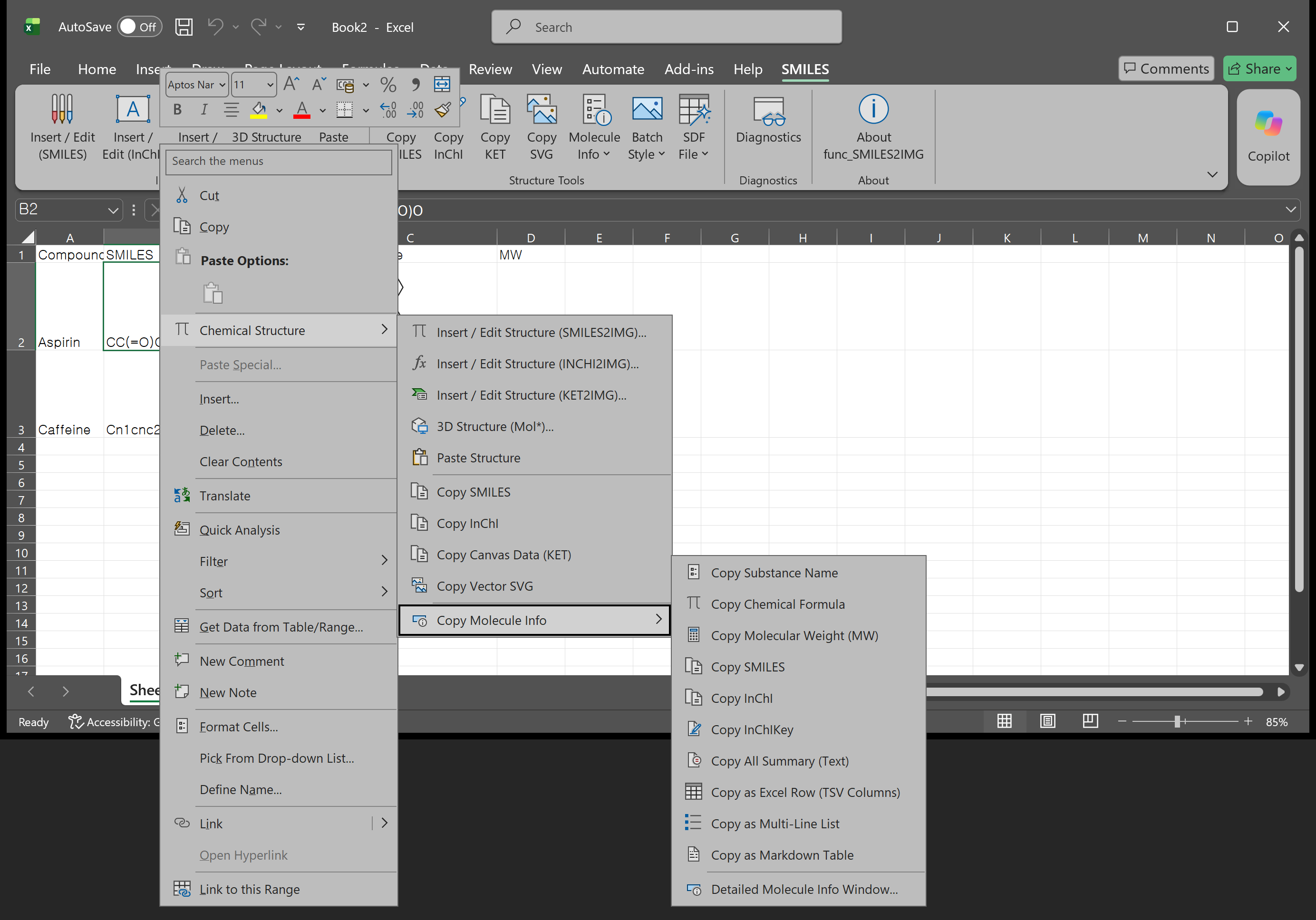
Right-clicking a worksheet cell (ContextMenuCell), an Excel Table (ListRange), a floating or in-cell picture (ContextMenuPicture), or a drawing / 3D shape (ContextMenuShape) exposes the Chemical Structure submenu:
3. Inspecting #VALUE! Syntax Errors with Diagnostics
When a cell formula returns #VALUE!, click [SMILES] ➔ [Diagnostics] on the ribbon. The log window records the failing formula function name and exact EPAM Indigo parser message (for example, SMILES2IMG: Indigo: unclosed ring #1), allowing you to pinpoint malformed SMILES, InChI, KET, or SMARTS strings quickly.
Related Guides
- Batch Style, TSV, 3D — Practical workflows for lossless sheet styling, 12-column TSV copy, and 3D PDB models
- SDF Import — 11-column
.sdfworksheet import into live Excel formulas - Formula Errors — Troubleshooting guide for
#NAME?,#VALUE!, and#N/Acodes