

PowerPoint Ribbon & Context Menus
Complete command reference for the Microsoft PowerPoint [SMILES] ribbon tab and the 5 slide Chemical Structure right-click context menus.
1. Top [SMILES] Ribbon Commands
| Ribbon Group | Button / Menu | What It Does in PowerPoint |
|---|---|---|
| Insert Structure | Insert / Edit Structure | Opens Ketcher 2D to insert onto the active slide (preloads selected TextBox text if present), or re-edits a selected 2D shape |
3D Structure (Mol*) | Opens Mol* 3D to insert a rotatable 3D Model (GLB) or transparent 2D Picture (auto-loads selected PDB ID), or re-edits a 3D shape | |
Paste Structure | Converts a selected TextBox (SMILES, InChI, KET, or compound name/CAS) in place, or pastes clipboard structure centered on slide | |
| Structure Tools | Copy SMILES / Copy InChI / Copy KET | Extracts canonical SMILES, IUPAC InChI, or lossless KET JSON (Shape.Tags["KET"]) from the selected shape or TextBox text |
Copy SVG | Copies lossless vector SVG graphics + <svg> XML text to the clipboard for A0 posters, Illustrator, or Inkscape | |
Molecule Info | Copies individual properties, multi-line speaker-note/card lists, 12-column tables, or opens the detailed property window | |
Batch Style | Restyles selected shapes—or every ungrouped 2D structure across the entire presentation deck when nothing is selected | |
| About | Online Docs | Opens the official PowerPoint documentation portal (/powerpoint/) in your web browser |
About func_SMILES2IMG | Displays installed version, embedded engine versions, open-source licenses, and update check |
2. Right-Click Context Menus (5 Slide Contexts)
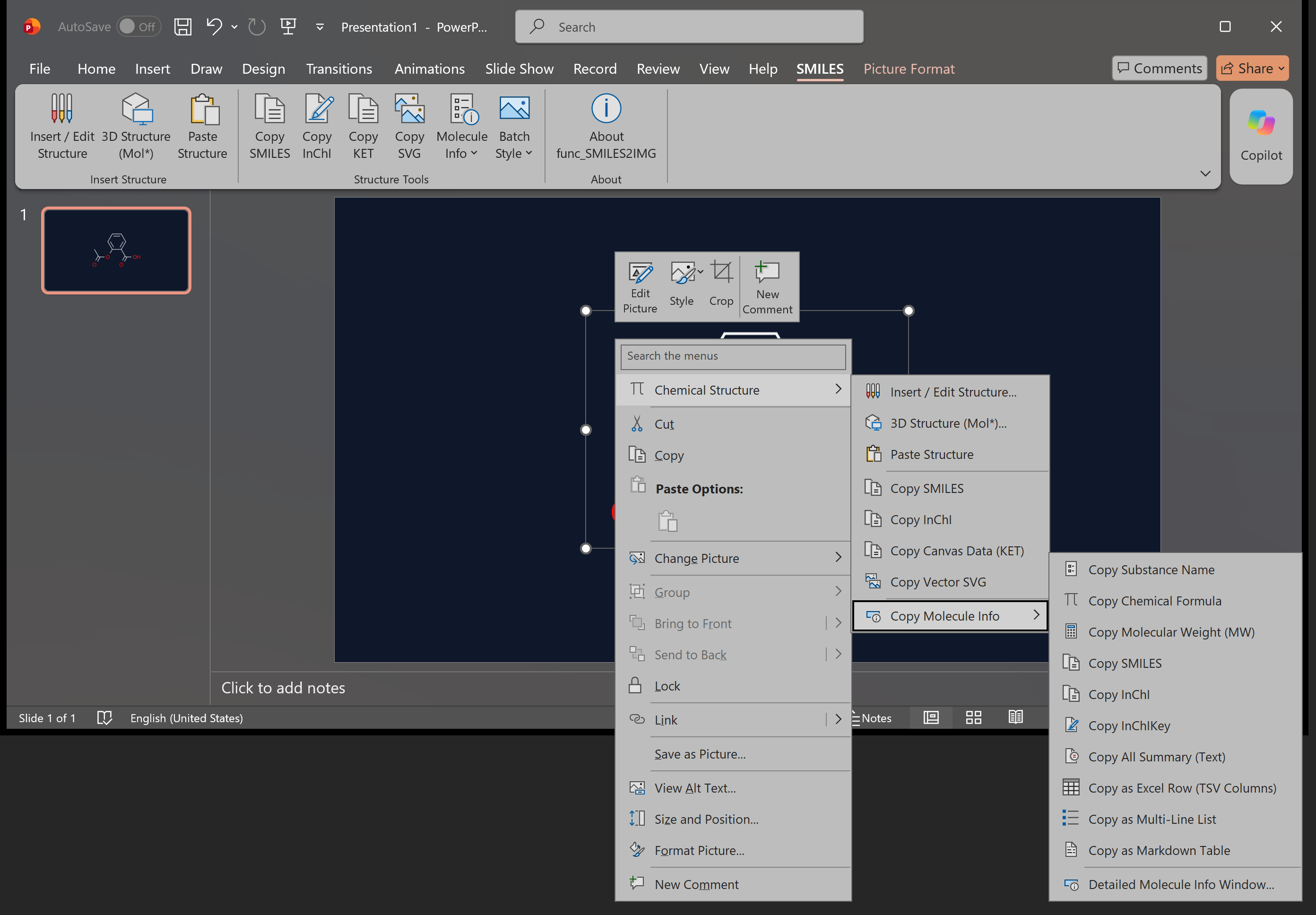
Right-clicking a picture (ContextMenuPicture), a shape (ContextMenuShape), inside an editing TextBox (ContextMenuText), or a table (ContextMenuTable) exposes the full 3-tier Chemical Structure menu; right-clicking an empty slide canvas / frame (ContextMenuFrame) shows quick insert commands (Insert / Edit, 3D Structure (Mol*), Paste Structure):
Related Guides
- Dark Slides & Grouped Shapes Troubleshooting — Fix white boxes, invisible dark lines, and grouped cards skipped by
Batch Style - 3D Models & Double-Click Troubleshooting — Troubleshoot
.glbrotation, file sizes, double-click editing, and podium PC sharing - 1. 2D Structures & Reaction Slides · 2. Dark Mode, Cards, Deck Restyle — Slide conversion and theme workflows
- Offline PDB Files (Mol*) — Load local
.pdb/.cifmodels without network access