

Word Ribbon & Context Menus
Complete command reference for the Microsoft Word [SMILES] ribbon tab and the 5 right-click Chemical Structure context menus.
1. Top [SMILES] Ribbon Commands
| Ribbon Group | Button / Menu | What It Does in Word |
|---|---|---|
| Insert Structure | Insert / Edit Structure | Opens Ketcher 2D to insert at cursor (preloads highlighted chemical text if selected), or re-edits the selected 2D picture |
3D Structure (Mol*) | Opens Mol* 3D to insert a 2D Picture (.png) or interactive 3D Model (GLB) (auto-loads highlighted PDB ID), or re-edits a selected 3D figure | |
Paste Structure | Converts highlighted SMILES, InChI, KET, or compound name/CAS in place (or converts clipboard data when nothing is highlighted) | |
| Structure Tools | Copy SMILES / Copy InChI / Copy KET | Extracts canonical SMILES, IUPAC InChI, or lossless Ketcher JSON from the selected structure picture or highlighted chemical text |
Copy SVG | Copies lossless vector SVG graphics + <svg> XML text to the clipboard for TOC graphics, Illustrator, or Inkscape | |
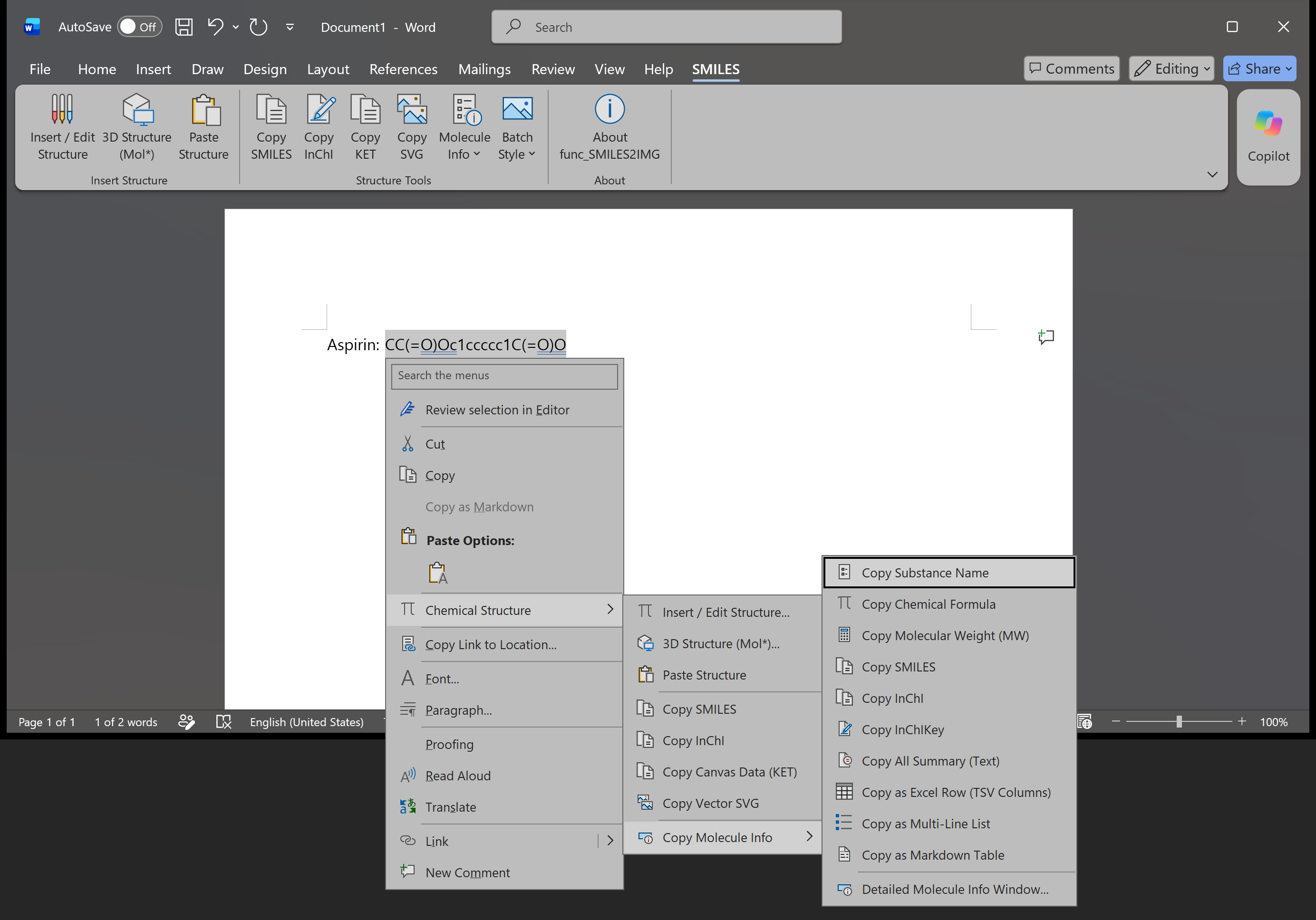
Molecule Info | Copies individual properties, 12-column tables, multi-line SI lists, Markdown, or opens the detailed property inspection dialog | |
Batch Style | Restyles structures inside the highlighted selection—or across the entire Word document when nothing is highlighted (Mol* figures skipped) | |
| About | Online Docs | Opens the official Word documentation portal (/word/) in your web browser |
About func_SMILES2IMG | Displays installed version, embedded engine versions, open-source licenses, and update check |
2. Right-Click Context Menus (5 Word Contexts)
Right-clicking an inline picture (InlinePicture), a floating picture (Picture), a drawing/3D shape (Shape), body text (Text), or inside a table cell (Table) displays the 3-tier Chemical Structure flyout menu:
Related Guides
- Double-Click & Editing Troubleshooting — Restore double-click editing and check Alt Text tags on shared
.docxfiles - Table Clipping & Batch Style Troubleshooting — Fix top-clipped inline structures, table column shifts, and selection scopes
- 1. 2D Structures & Reaction Schemes · 2. SAR Tables & Experimental Properties — Input modes and layout-safe compound tables
- Missing Ribbon Tab — Re-enable disabled COM add-ins in Word